{ "@context": "https://schema.org", "@type": "WebPage", "@id": "/posts/labview-examples-sensors", "name": "LabVIEW Examples for NXT: Sensors | Engineering with Bricks", "description": "See LabVIEW sensor examples in this PDF, including graphing sensor values on the front panel and a line follower from the Behaviors section of LabVIEW 2010.", "url": "/posts/labview-examples-sensors", "inLanguage": "en", "mainEntity": { "@type": "Article", "headline": "LabVIEW Examples: Sensors", "description": "See LabVIEW sensor examples in this PDF, including graphing sensor values on the front panel and a line follower from the Behaviors section of LabVIEW 2010.", "image": "https://cdn.prod.website-files.com/65b933e10656d98773dd067c/6739ec5608efbe5ead731ddb_LabVIEW-Graphing-sensor-values.avif", "datePublished": "2013-09-20", "author": { "@type": "Person", "name": "" } }, "breadcrumb": { "@type": "BreadcrumbList", "itemListElement": [ {"@type": "ListItem", "position": 1, "name": "Home", "item": "/"}, {"@type": "ListItem", "position": 2, "name": "Articles", "item": "/articles"}, {"@type": "ListItem", "position": 3, "name": "LabVIEW Examples: Sensors", "item": "/posts/labview-examples-sensors"} ] } }

Are we missing anything?
Let us know!

Thank you! Your submission has been received!
Oops! Something went wrong while submitting the form.

LabVIEW Examples: Sensors

Sep 2013
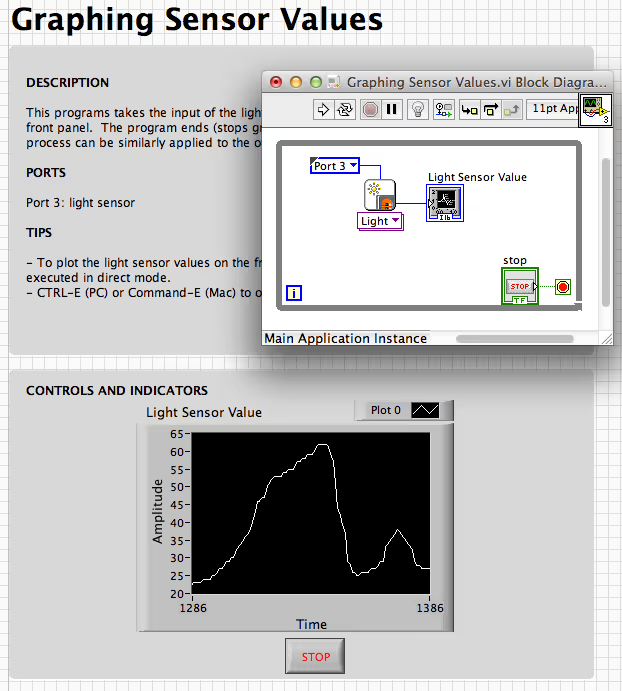
Graphing sensor values

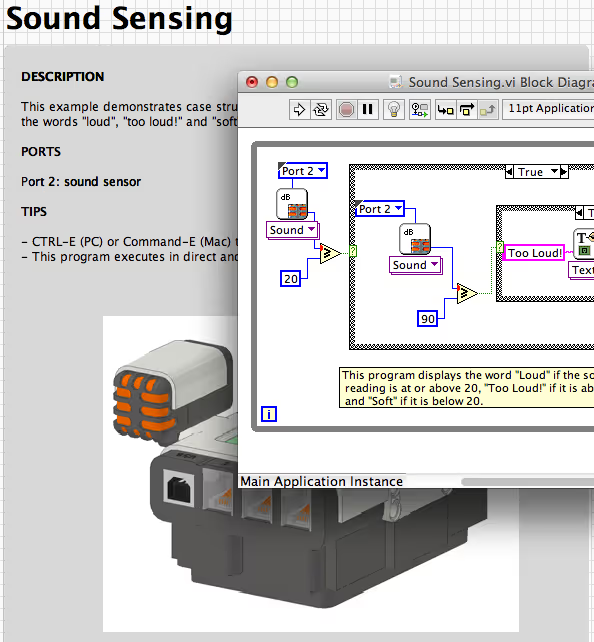
These examples (PDF) demonstrate the use of sensors in LabVIEW.

Graphing sensor values

  • This program takes sensor values and graphs them on the front panel.

Line follower

  • This program is provided in the "Behaviors" section of LabVIEW 2010. It can be very useful in more advanced projects, such as creating an NXT Trolley (a vehicle that follows a line, and stops with touch or sound.)

Multiple inputs and outputs

  • This example demonstrates how to use multiple sensors and motors to control a vehicle. The while loops and case structures control the movement of the car. The purpose of the nested while loops is to permit holding down the buttons.

Use Sensor Values

  • In this example, the NXT uses the values of the light and ultrasonic sensors to power the motor.
Resources

Related Articles

Up Arrow
FEEDBACK
Up ArrowUp Arrow